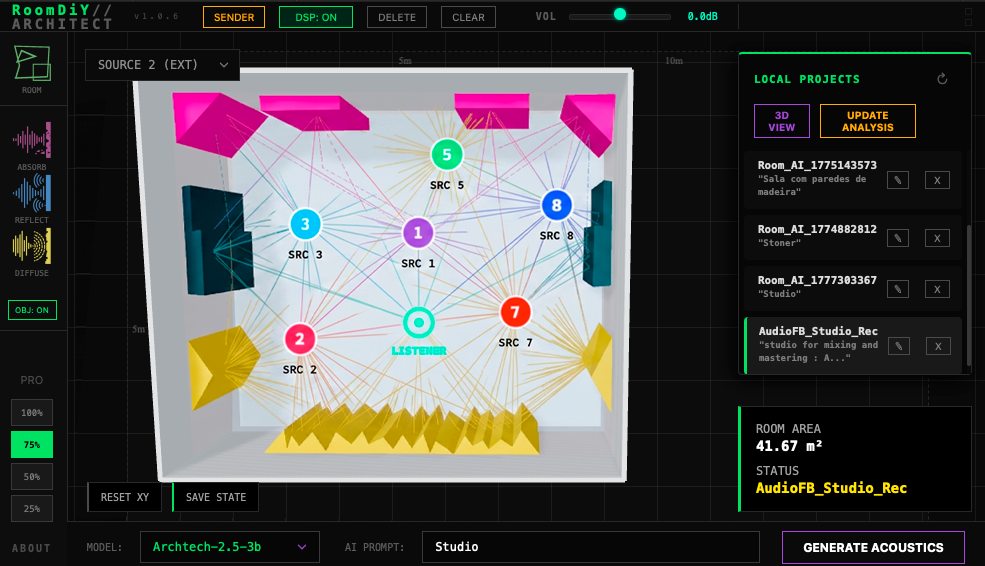
Acoustic Room Simulation

Advanced real-time acoustic modeling and room analysis for professional audio production.

▸ Real-time acoustic simulation

▸ Advanced room mode analysis

▸ Multi-source positioning system

▸ AI-powered acoustic reports

Acoustic Visualization

What is RoomDiY?

RoomDiY is a professional-grade audio plugin that brings real-time acoustic room simulation directly into your digital audio workstation. Unlike traditional reverb plugins that use pre-recorded impulse responses, RoomDiY generates acoustic environments dynamically based on room geometry, material properties, and sound source positioning.

The plugin combines advanced signal processing with sophisticated acoustic modeling to deliver authentic room acoustics. Whether you're mixing in a virtual studio or designing immersive audio experiences, RoomDiY provides the tools to sculpt and analyze acoustic spaces with precision.

How It Works

1. Room Creation & Geometry

Define your acoustic space by drawing room geometry in the intuitive 2D editor. Specify dimensions, wall materials, and acoustic properties with precision.

▸ Custom room dimensions

▸ Material absorption coefficients

▸ Wall reflection properties

▸ Diffuser placement and configuration
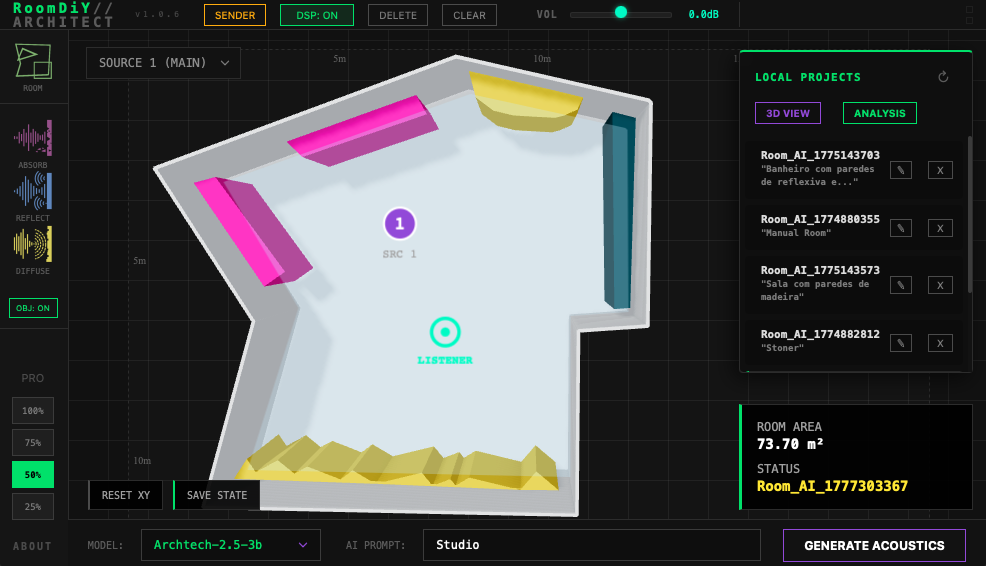
Room Creation
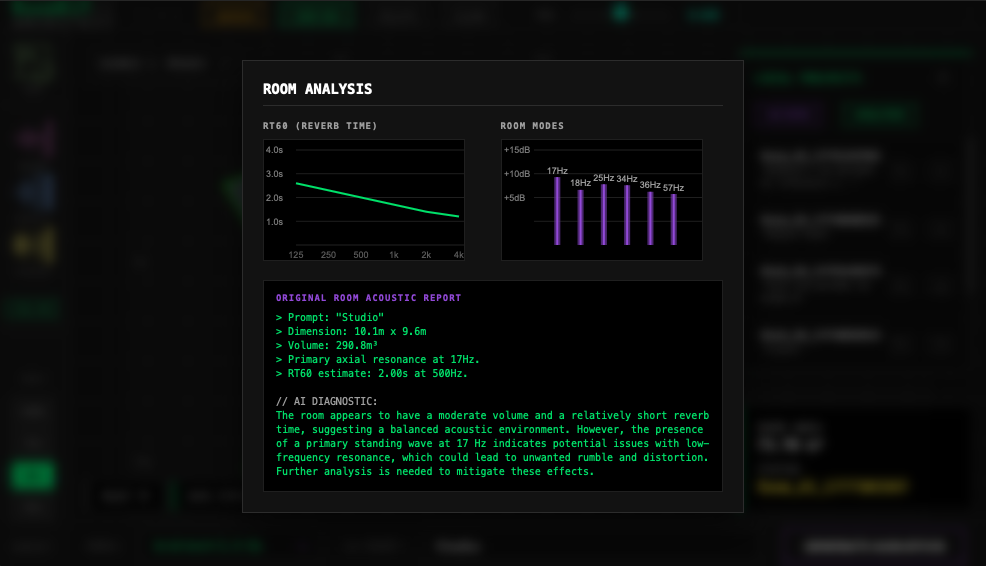
Acoustic Analysis

2. Acoustic Analysis & Reports

RoomDiY analyzes your room's acoustic characteristics and generates comprehensive technical reports powered by AI-driven acoustic analysis.

▸ RT60 reverb time calculations

▸ Room mode frequency analysis

▸ Frequency response curves

▸ AI-generated acoustic insights

3. Source & Listener Positioning

Position up to 8 independent audio sources and a listener point in your virtual room. The system calculates accurate acoustic paths and reflections in real-time.

▸ 8 simultaneous audio sources

▸ Precise XY positioning

▸ Real-time parameter automation

▸ Multi-track DAW integration
Positioning

How Objects Are Created & Calculated

When you create acoustic treatment objects in RoomDiY—absorbers, reflectors, and diffusers—the plugin calculates their acoustic impact on the room's behavior. Each object is positioned within your room and contributes to the overall acoustic response.

Absorbers

Reduce sound energy by converting acoustic waves into heat. The plugin calculates how much sound energy is absorbed based on the material properties and surface area you define.

Reflectors

Bounce sound waves around the room. The system traces reflection paths from sound sources to the listener, accounting for the angle and position of each reflector.

Diffusers

Scatter sound waves in multiple directions, reducing standing waves and flutter echoes. The plugin calculates the diffusion pattern based on the surface geometry.

Position & Distance Calculation

The core calculation involves determining the distance between a sound source and the listener position. This distance determines how much the sound attenuates (gets quieter) as it travels through the room. The plugin also calculates the time delay between direct sound and reflections, which affects how the room sounds.

// Calculate direct distance between source and listener

distance = √((x_listener - x_source)² + (y_listener - y_source)²)

// Calculate propagation delay (sound travels at ~343 m/s)

delay = distance / 343

// Calculate amplitude attenuation based on distance

attenuation = 1 / (1 + distance²)

Acoustic Analysis & Technical Reports

RT60 Analysis

Measures how long it takes for sound to decay by 60 decibels. This is calculated across different frequency bands to understand how your room behaves at low, mid, and high frequencies. A room with high RT60 will sound very reverberant, while low RT60 means the room absorbs sound quickly.

Room Mode Detection

Identifies resonant frequencies where room dimensions create standing wave patterns. These are frequencies that naturally amplify in your room based on its physical dimensions. The plugin detects these modes so you can address them with acoustic treatment.

Frequency Response

Shows how your room responds across the entire audio spectrum. This helps you understand which frequencies are boosted or reduced by your room's geometry and materials, allowing you to make informed decisions about acoustic treatment.

AI-Powered Acoustic Insights

RoomDiY generates intelligent analysis reports that provide actionable insights about your room's acoustic characteristics. The AI system analyzes the data to identify problematic frequencies, suggest treatment placement, and evaluate listening position quality.

▸ Problem Detection

Identifies problematic frequencies and resonances

▸ Treatment Recommendations

Suggests optimal placement for acoustic treatment

▸ Listening Position Analysis

Evaluates acoustic characteristics at your listening position

See It In Action

Watch a complete walkthrough of RoomDiY's features, from room creation to acoustic analysis and real-time audio processing.


Get RoomDiY Free

The free version of RoomDiY has some limitations, such as a limited number of rooms that can be created, and rooms up to 100m².

If this tool is useful for your workflow, help us keep it updated by purchasing the PRO version.

System Requirements

macOS

• macOS 10.15 or later

• Intel or Apple Silicon

• 8GB RAM minimum

• VST3, AU, AAX compatible

Windows

• Windows 10 or later

• Intel Core i5 or equivalent (AVX Support Required)

• 8GB RAM minimum

• VST3, AAX compatible

⚠️ IMPORTANT STABILITY NOTICE

RoomDiY utilizes advanced Neural Networks (LLM) to perform local acoustic calculations. This process is extremely demanding on the CPU's mathematical instructions.

  • AVX Instructions: Your processor must support AVX instructions. Older Intel Celeron, Pentium, or Atom processors will likely cause the DAW to close abruptly when clicking "Generate Acoustics".
  • Windows Stability: On some Windows 10 configurations with limited hardware, the WebView2 interface may experience synchronization delays. If the AI model list does not appear, wait 5-10 seconds for the internal bridge to initialize.
  • Resource Intensive: We recommend closing heavy background applications during the generation process to avoid memory starvation on systems with only 8GB of RAM.